はじめに
この記事はiOS2 Advent Calendar 2017 の10日目の記事です。
本記事では今年発表されたiOS11で改善された UIStackView 周りの Constraint 対応について紹介したいと思います。UIStackView はiOS8以前に、開発者が AutoLayout を駆使して View と View 間のマージンやパディングを設定していた状況を一変させました。
その中でも厄介だったのが、 UIStackView の子要素に UIStackView があり、元の UIStackView を非表示にすると Constraint エラーが発生するパターンです。
iOS10で発生するConstraintエラー
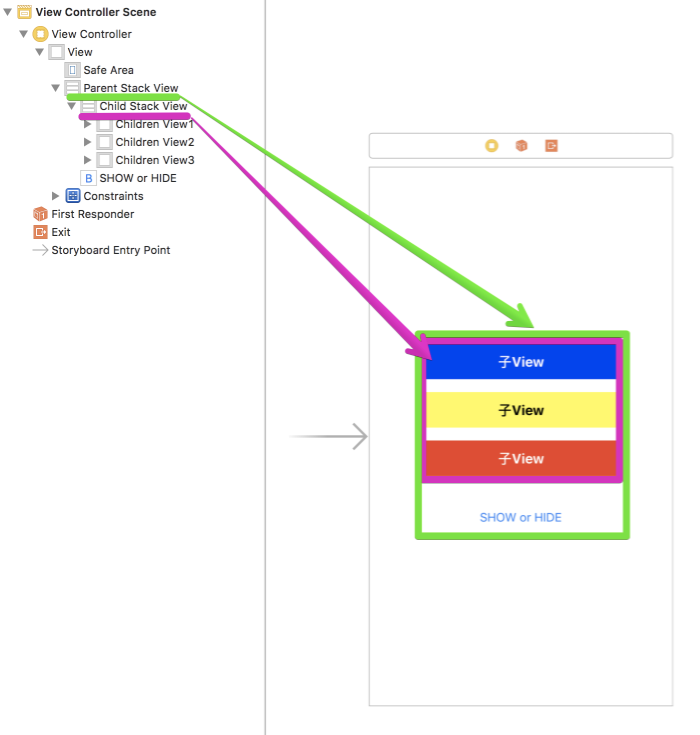
例えば、下図のような構成の View を作成する必要があったとします。
このレイアウトは、
width と height が 固定幅の UIView 3つを子要素として持つ Child Stack Viewその Child Stack View と UIButton を子要素に持つ Parent Stack View
で構成されています。UIStackView の子要素に UIStackView を持つレイアウトを実装し、SHOW or HIDE ボタンをタップ時に表示/非表示を切り替えるように実装するとします。
その場合、非表示にしたタイミングで、iOS10では下記の Constraint エラーが発生します。
1
2
3
4
5
6
7
8
9
10
11
12
13
14
15
16
17
18
19
20
21
22
23
24
25
26
27
28
29
30
31
32
33
34
35
36
37
[ LayoutConstraints ] Unable to simultaneously satisfy constraints .
Probably at least one of the constraints in the following list is one you don ' t want .
Try this:
( 1 ) look at each constraint and try to figure out which you don ' t expect ;
( 2 ) find the code that added the unwanted constraint or constraints and fix it .
(
"<NSLayoutConstraint:0x618000095a90 UIView:0x7ffc6dc04350.height == 44 (active)>" ,
"<NSLayoutConstraint:0x610000097020 'UISV-canvas-connection' UIStackView:0x7ffc6de08680.top == UIView:0x7ffc6df0b170.top (active)>" ,
"<NSLayoutConstraint:0x610000097980 'UISV-canvas-connection' V:[UIView:0x7ffc6dc04350]-(0)-| (active, names: '|':UIStackView:0x7ffc6de08680 )>" ,
"<NSLayoutConstraint:0x6080000944b0 'UISV-hiding' UIStackView:0x7ffc6de08680.height == 0 (active)>" ,
"<NSLayoutConstraint:0x6100000979d0 'UISV-spacing' V:[UIView:0x7ffc6df0b170]-(16)-[UIView:0x7ffc6dc088c0] (active)>" ,
"<NSLayoutConstraint:0x610000097a20 'UISV-spacing' V:[UIView:0x7ffc6dc088c0]-(16)-[UIView:0x7ffc6dc04350] (active)>"
)
Will attempt to recover by breaking constraint
< NSLayoutConstraint: 0x618000095a90 UIView: 0x7ffc6dc04350 . height == 44 ( active ) >
Make a symbolic breakpoint at UIViewAlertForUnsatisfiableConstraints to catch this in the debugger .
The methods in the UIConstraintBasedLayoutDebugging category on UIView listed in < UIKit / UIView . h > may also be helpful .
2017 - 12 - 09 16 : 46 : 15.542896 + 0900 FacebookManagerSample [ 94864 : 5445545 ] [ LayoutConstraints ] Unable to simultaneously satisfy constraints .
Probably at least one of the constraints in the following list is one you don ' t want .
Try this:
( 1 ) look at each constraint and try to figure out which you don ' t expect ;
( 2 ) find the code that added the unwanted constraint or constraints and fix it .
(
"<NSLayoutConstraint:0x610000097020 'UISV-canvas-connection' UIStackView:0x7ffc6de08680.top == UIView:0x7ffc6df0b170.top (active)>" ,
"<NSLayoutConstraint:0x610000097980 'UISV-canvas-connection' V:[UIView:0x7ffc6dc04350]-(0)-| (active, names: '|':UIStackView:0x7ffc6de08680 )>" ,
"<NSLayoutConstraint:0x6080000944b0 'UISV-hiding' UIStackView:0x7ffc6de08680.height == 0 (active)>" ,
"<NSLayoutConstraint:0x6100000979d0 'UISV-spacing' V:[UIView:0x7ffc6df0b170]-(16)-[UIView:0x7ffc6dc088c0] (active)>" ,
"<NSLayoutConstraint:0x610000097a20 'UISV-spacing' V:[UIView:0x7ffc6dc088c0]-(16)-[UIView:0x7ffc6dc04350] (active)>"
)
Will attempt to recover by breaking constraint
< NSLayoutConstraint: 0x610000097a20 ' UISV - spacing ' V: [ UIView: 0x7ffc6dc088c0 ] - ( 16 ) - [ UIView: 0x7ffc6dc04350 ] ( active ) >
Make a symbolic breakpoint at UIViewAlertForUnsatisfiableConstraints to catch this in the debugger .
The methods in the UIConstraintBasedLayoutDebugging category on UIView listed in < UIKit / UIView . h > may also be helpful .
これには2つの要因があります。
子要素の UIView の height が 44pt 固定にも関わらず、 UIStackView が非表示 ( = height が 0pt ) になる
UIStackView 内の子要素同士は 16pt ごとに間隔を空ける指定をしているにも関わらず、 UIStackView が非表示 ( = height が 0pt )になる
上記2要素を解決すれば Constraint エラーを解消することができます。
iOS10でConstraintエラーを解消する方法
では、具体的に Constraint エラーを解消してみましょう。
1つ目の原因の解決方法
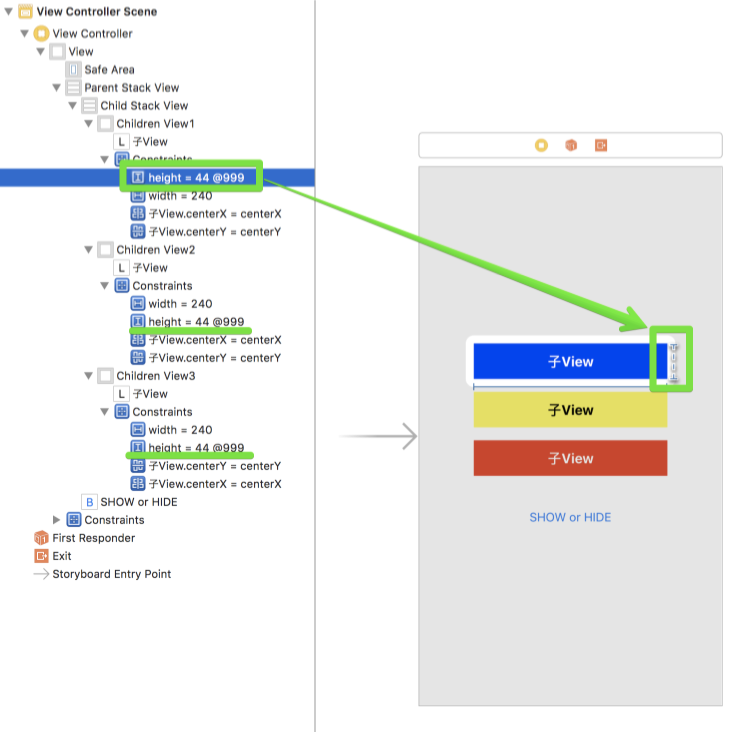
先程上げた要因の1点目は Storyboard 上で解決可能です。
親の UIStackView が非表示になることで、子要素の UIView が 0pt になる可能性があるので、Constraint の Priority を 999 以下にします。Priority が 1000 だからです。
2つ目の原因の解決方法
続いて要点の2点目の解決方法です。Child Stack View が非表示になることで、3つの子要素の UIView も強制的に非表示になってしまいます。Child Stack View は3つの子要素である UIView に 16pt の間隔を空けるように指定しています。UIStackView 内に UIStackView を持つ場合に発生し、 UIStackView 単体の場合は発生しません。
具体的に実装した解決方法は以下です。
1
2
3
4
5
6
7
8
9
10
11
12
13
14
15
16
17
18
19
20
21
22
23
24
25
26
27
28
29
30
31
32
33
34
35
36
37
38
39
40
41
42
43
44
45
46
47
48
49
50
51
52
53
54
55
56
57
import UIKit
class ViewController: UIViewController {
// MARK: - IBOutlets
@ IBOutlet private var stackView: UIStackView !
@ IBOutlet private var childrenView1: UIView !
@ IBOutlet private var childrenView2: UIView !
@ IBOutlet private var childrenView3: UIView !
// MARK: - Properties
private var isHidden = false // 現在の表示・非表示の状態を保持
override func viewDidLoad () {
super . viewDidLoad ()
// Do any additional setup after loading the view, typically from a nib.
}
override func didReceiveMemoryWarning () {
super . didReceiveMemoryWarning ()
// Dispose of any resources that can be recreated.
}
// MARK: - IBActions
@ IBAction private func onTappedButton ( _ sender: UIButton ) {
// ボタンタップ時に表示・非表示の切り替え
showOrHideSubView ()
}
}
extension ViewController {
func showOrHideSubView () {
if isHidden {
// 表示する場合
// 自身を表示
stackView . isHidden = false
// 子要素を表示
stackView . subviews . forEach {
$0 . isHidden = false
}
// 表示・非表示状態の更新
isHidden = false
return
}
// 非表示にする場合
// 自身を非表示
stackView . isHidden = true
// 子要素を非表示
stackView . subviews . forEach {
$0 . isHidden = true
}
// 表示・非表示状態の更新
isHidden = true
}
}
上記2点の改修を加えた上でiOS10で実行すると Constraint エラーが発生していないことがわかると思います。
iOS11でどうなるか…
ではでは、iOS11ではどうなっているのかというと…Constraint エラーが解決されています!!@999 つけたり、 subViews を hidden にしなくて良いのは手間がかからず非常に助かりますね!
まとめ
如何でしたでしょうか?UIStackView を利用する気になってきますね!